
.jpg)

March 1, 2026
Standard Work and Business Processes During Abnormal TimesStandard Work
All wineries and vineyards follow some form of “Standard Work”. They have at least some documented processes or system controls (purchases and expense limits and approvals, etc.), reporting structures, compliance reporting and so on. Many will have additional business and operational processes documented; for example, for business critical processes, operations with safety risks, and cross functional procedures. A few, such as those following methodologies such as Lean, have most if not all processes and procedures documented.
During coronavirus, every winery will be affected to some degree, as is everyone for that matter. The level of disruption will vary, but those that have documented, effective, and current processes, should be better placed to address the challenges presented by this pandemic. (I’ll discuss a bit later what the characteristics of effective and current processes are, and the characteristics of those that aren’t.) As we all know, coronavirus has affected organizations in many ways: reduced workforce due to sickness or child caring responsibilities or shelter in place directives, a disrupted supply chain (supplies not available or delayed) or distribution channels reduced or even disappeared.
How Standard Work helps during abnormal times
While a vineyard or winery with a well implemented Standard Work system in place will not miraculously have a better supply chain or enjoy pandemic-proof demand, or access to a healthier labor force, they should be able to adapt to the disruptions better than those that don’t. How?
Here are a few examples:
If part of a process is disrupted or can’t be executed, the effect of that within the process will be understood. The role of the steps are visible and corrective or remedial steps put in place to address the disruption. It may even show that a particular process is not viable due to the impact in which case it may be cheaper or safer to shut an entire process or operation down than continue to execute it based on the steps that can’t be executed or executed in full.
You will know what each person or role does within the process and how what they do fits into the larger operation. Each of the steps, inputs and outputs, controls and interactions will be well understood. If the workforce is not able to operate under normal conditions, whether due to working remotely, or working in the field but under physical distancing, or splitting crews into smaller groups in the cellar, this can be addressed. If the person who regularly executes a task can’t because they are home with a child, there is an SOP in place so someone else can take over for them as what they do is documented. If a vineyard crew is working alternate rows in a block, the SOP can be quickly and temporarily adjusted to allow for this. If one group needs to hand off to another due to smaller crew sizes, each knows what the other expects as an input and output. In all these examples, work may be impacted to varying degrees, but should be able to continue safely and while maintaining the required quality.
Lastly, even if the disruption has made no impact on your teams or supply chain or to your demand, it may still affect the processes themselves. Combating coronavirus has brought with it distancing and increased sanitation and cleaning requirements. Perhaps harvest or cellar equipment has to be cleaned before and after each use, workers need to more regularly wash their hands and sanitize their hands, or as discussed before, operate further apart from each other. With well document Standard Work, such as process maps, where, when and how to apply what may be temporary changes to the process can be done quickly and easily; it may just be taking an existing process map and with a marker, highlighting when equipment needs cleaning, or adding reminders to clean hands or to wear masks or gloves.
In each of these examples, the key is to fully understand what was happening before the interruption via documented Standard Work. That allows the organization to adjust to the change in circumstances as quickly as possible while maintain quality, safety and, as much as possible, productivity. They are not making decisions blindly or finding themselves unsure how to proceed because the one person that new how to do “x” is suddenly off sick.
How to manage process change during a disruption?
So you’re in the midst of coronavirus and you have processes in place. How do you manage your processes during the disruption? How do you modify a process when you can’t get all the process participants in a room together to work it out? While this is not ideal, in these times you need to be flexible. Perhaps you can use an online conferencing tool to get everyone “together”, or just get as many people together as possible, or start with one key person and have them have a stab at it, then share that around. Importantly, now more than ever, don’t let perfect be the enemy of good; document the changes you are making to the process and continue to keep the principles of good process design front of mind. If the process changes are scribbled over a process map in an SOP or on a whiteboard and a photo taken and texted, if that gets you to where you need to be right now, that’s good enough. As you make changes to your processes, consider doing trials to make sure it’s going to work as you expect, and make adjustments if it doesn’t.
Make sure any changes, whether temporary or not, are documented and shared with all those involved in the process; the risk in a time such as this is that standards get thrown out the window, as “we don’t have time for this and we just need to get ‘x’ done”. More than ever, standard processes are your friend right now; they will reduce mistakes and rework and injuries, when you can least afford them. If anything, now is a time to slow down and make sure the standards are in place and being followed, as you deal with lower finished good inventory, lower or slower supplies, fewer employees, or reduced sales to cover the mistakes and inefficiencies that would normally be okay.
What if your processes are out of date? You can only work with what you have; if they are more helpful than not, follow the above process to make the changes you need to make them more helpful. Start with quickly identifying which steps are still happening and which aren’t and to what degree, and again, without letting a perfect outcome be a hindrance, get as quickly as possible to what you think the current process is. Then work out where and how it needs to change to adapt to these circumstances. There likely to be some more trial and error if this is your staring point, but progress is still achievable.
What if you don’t have any processes documented, or have many that aren’t documented or standardized? Start by keeping it simple. If it’s just jotting down the steps of the most business critical operations on paper or a whiteboard, or even just identifying those business critical processes, that should all help at this stage. Have people make a note of what they are doing while they are doing it (if safe to do so, or immediately after if not), or what new hurdles they are encountering due to coronavirus, or where the process is breaking down. Use that information to record the current process. You may even find opportunities to improve or innovate.
Focus on the highest priorities
While doing this your primary focus should be on what process or standards do we need to be doing today to stay afloat, keep our product or service moving, keep our employees safe and employed. Keep your eye on the big picture and follow “the biggest bang for your buck” approach; what processes keep you awake at night.
Keep an eye on what process changes you are making today that may be worth keeping long term. It is likely that while you tune your process to address coronavirus, you identify steps about which you ask “why are we doing this (or doing it this way) anyway” and the answer may be along the lines of “we never thought about it before” or “yes, it’s inefficient, but it didn’t really matter before”.
In some cases, you may remove or modify steps now because you have to and can, but take note of these steps and flag them to be reviewed when life returns to whatever the future normal, to see if they are needed or not. In some cases, you may not be able to change these steps now because circumstances or resources don’t allow it; it’s even more important you flag these now for review later when circumstances may allow to address them.
What defines effective and efficient processes (aka what is good Standard Work)?
Let’s start by looking at a few key faults with many business procedures.
Firstly, they are designed to “control” the people or systems who make up the process; they are designed to “stop” the wrong thing happening, the wrong person doing something.
Secondly, once in place they are considered permanent, as though etched in two tablets and brought down from Mt Sinai by Moses, never to be challenged or changed again.
Thirdly, they are developed by the wrong people; often by the boss or the department that is dependent on the outcome of the process (for example, finance) or by one department involved in the process but not the other two or three departments.
What’s wrong with these three characteristics of processes? Fundamental to this is the question “what is the purpose of a standardized business process”? The primary purpose should be, as we at Azmera like to state it, to make each process or operation “safer, better and easier” (aka improve safety, quality, and productivity).
We need controls in place: the most obvious example are safety protocols to prevent injuries; this is especially so in highly physical industries like wine. However, an effective process should allow the organization to operate more efficiently; where controls or limits are required they should be applied but they should not be the primary purpose of a process.
We want our processes standard so that they produce consistent, predictable and safe outcomes. However, that doesn’t mean they shouldn't be adaptable. A standard that doesn’t reflect the current needs of the business may be worse than no standard at all.
Let’s look at an example. Across just the US and Australia in the last two years we have seen: a trade war between the US and China that has massively impacted US farmers; a separate trade dispute between the US and Europe over airplane construction that resulted in, bizarrely, US tariffs on European wine; massive droughts in Australia followed by historically devastating bushfires that severely impacted agriculture, in general, and the wine industry additional with the potential of smoke taint. This was all followed, of course, by the onset of coronavirus and it’s impact on all aspects of industry and life. A business model with supporting processes that may have been optimal for a company as recently as 2 years ago (let alone processes written in stone 5 or 10 years ago), are likely to be outdated and hindering that same business today. Standard Work needs to be regularly reviewed to make sure it is still fulfilling its purpose of helping the business function “safely, better and easier”.
Finally, all the participants involved in the operation of a process need to be involved in defining that process. Having one team define the standard is almost certainly going to result in a process that almost exclusively satisfies the needs of that team, to the exclusion and sometimes at the expense of the needs of the others teams in the process. This is most likely when a support function defines an operational process so they can apply their controls. Effective process standardization includes all the parties involved in a process either directly or who provide inputs or receive outputs of the process. This may involve compromise on the behalf of some but if it is done from a point of providing the business with an overall safer, better and easier outcome, a more effective process will be the result almost every time.
Good luck with addressing the challenges that coronavirus brings to your winery or vineyard operations and, above all, I hope you and your teams and families come through this safe and well.
February 18, 2026
Drinking our own champagne: Azmera running odoo
Over the Christmas/New Year break, we took our own advice to heart and migrated to odoo for our own consulting business.
Over the last few months as we've been building out our odoo for Wine offering and roadmap, we have been looking at the approximately 80 apps/modules that come with standard odoo. We started to realize that several covered functionality that we were managing in several separate apps and systems, so asked ourselves, why aren't we running odoo ourselves? We didn't have a good reason as to why not, so we decided to do exactly that - migrate from several disparate systems to odoo and starting drinking our own champagne. A pleasant surprise, although perhaps it shouldn't have been, is that we're saving on annual subscriptions as well.
Here are the functions and systems we've moved off and are now running out of odoo.
Waveapps: Accounting, Invoicing, Payments. Our main book-keeping system; had to manually enter invoice hours and expenses.
Avaza : Projects, Timesheets and Expenses. We used this to record timesheets for our client projects and internal time including PTO. We also used it to track recurring and one-off expenses that were either tied to projects or which reimbursement was needed. We didn't invoice out of Avaza but we used its invoicing functionality to keep track of what times and expenses were invoiced or needed invoicing.
Website: Hosted with Dreamhost and written in WordPress; we had originally paid someone to develop the website but were maintaining the updates internally
Agile CRM: Tracked our leads here but had to go into Avaza and Waveapps when they converted to projects and sales.
Apart from having the one login and system to manage all of the above, here are the benefits we saw:
Cost: we are expecting a 59% reduction in subscription fees year 1, and 43% reduction each year after that (more in year 1 due to a first year discount).
Timesheets and expenses are now directly tied to Sales Orders and Invoices; no re-entering hours or expenses from one system to another.
Enquiries on our website now automatically generate leads in odoo CRM, which can then convert to a Sales Order if and when it gets that far.
We are now active users of odoo running our own business, so we're seeing and learning first hand what works, how to resolve problems, and how to optimize odoo, so we should be able to better support our winery and other users.
A bonus was the migration from all the above systems onto odoo took about 2 or 3 days; over the weeks since then we've certainly finetuned some processes, tweaked reports and forms, etc. (all of which, by the way, is pretty simple in odoo) but we were up & running in a few days.
We aren't quite finished; there are a few more modules & functionality we're looking to add over the coming weeks and months. Another bonus with odoo is you pay one fee and get access to everything; we can scale and add more apps when our business needs it or we have the bandwidth to do it.
Help Desk: we had previously used Zoho but we didn't find it a great fit so had stopped using it recently while we looked for something new; odoo has a Help Desk app so we'll be using that.
Customer Portal: when we enable this, customers will be able to click directly on invoices to view timesheets tied to an invoice, ask questions online about an invoice, etc.
Payroll: this one's a bit further off; this is a relatively new offering from odoo and, to be honest, still lacks a bit of integration with the tax authorities that we're willing to pay to have done for us at present. When they cover this we'll seriously look at incorporating payroll as well.
Now, to be fully transparent, we're a consulting company and not a winery, so we've implemented "standard" odoo, not our odoo for Wine extension. Our business model and processes are a lot simpler than a winery of course, but we are now drinking our own champagne and reaping the benefits.
If you're a winery (or brewery or cidery for that matter) and would like a demo or to discuss odoo for Wine, or even a consulting company like us, and would like to learn more about odoo in general, click here.
February 12, 2026
Azmera Celebrates 10 YearsAzmera officially formed 10 years ago today on February 12th, 2016. What a journey it's been. Thank-you to everyone who has been part of that journey.
?? Thank-you to everyone who has worked for us: from our owners to employees and sub-contractors and, of course, their families.
? Thank-you to all the companies across wine and agriculture who have trusted us to be a part of their journey and contribute to their success.
? Thank-you to all the companies we have partnered with; whether to work on projects together or those whose products we've sold and implemented.
? Lastly, but not least, thank-you to everyone who just said hello to us and wished us well along the way.
Here's to 10 more.
January 8, 2026
Winery Finance Teams - Outgrowing QuickBooks + Bill? Or Looking for a New ERP System? If your AP process is getting heavier, approvals are becoming more complex, and you’re stitching together systems to manage inventory and sales… you’re not alone.
I’m hosting a 60–90 minute webinar to walk through a finance-first comparison of: Odoo for Wine vs QuickBooks + BILL with a deep focus on the workflows that matter most for wineries:
- AP automation + invoice capture (OCR)
- Multi-level approvals (by amount, department, vendor, etc.)
- Analytic distributions — allocate overhead across departments/channels without spreadsheets
- Order-to-cash workflows (DTC + wholesale)
- Inventory visibility + valuation + traceability
- DTC integration for POS, clubs, and DTC
- Winemaking integrations — connecting winemaking data to bottling, inventory, and finance.
While this webinar will compare and contrast to Quickbooks, it should be valuable for any winery struggling with their current ERP (accounting, inventory, sales, purchasing), or lack of, or thinking of moving to a new system.
If you want a modern system that connects operations + finance and reduces month-end headaches, this will be practical and worth your time.
Thu, Jan 15 @ 1:00 PM - 2:30 PM PST
November 17, 2025
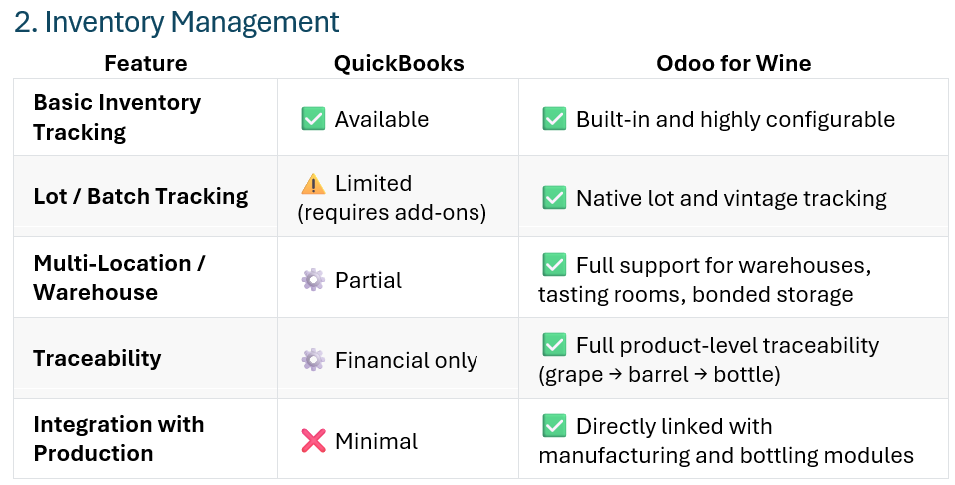
QuickBooks vs odoo for Wine Let’s Build a Smarter Winery Operation
At Azmera, we help wineries modernize their operations — integrating odoo with DTC and winemaking platforms to create one connected, data-driven business.
→ Talk to our team about streamlining your winery’s accounting, production, and sales with odoo for Wine.
→ To see a detailed side-by-side comparison of QuickBooks vs odoo for Wine click here to read on our site.
Find the right system to manage your winery’s growth — from bookkeeping to full-scale operations.
Running a winery means more than making great wine — it’s balancing artistry, agriculture, and business. From vineyard management to bottling, from tasting room sales to club shipments, every part of your operation needs to work in harmony. The right software can make that possible.
QuickBooks is a trusted solution for wineries that need reliable accounting and basic inventory control. It’s simple, familiar, and perfect for smaller teams focused on financial clarity and straightforward sales.
But as your winery grows — adding new sales channels, managing complex production, and expanding distribution — you need more than bookkeeping.
That’s where odoo for Wine delivers. With over 13 million odoo ERP users worldwide and adoption across 175+ countries, odoo is one of the fastest-growing business platforms in the world. It connects your accounting, production, inventory, CRM, and sales in one powerful system — designed to scale with your winery and grow with your business.
Whether you’re tracking barrels, managing bottling runs, or optimizing club and DTC sales, odoo for Wine brings your entire business together.
QuickBooks keeps your finances on track. odoo for Wine runs your winery.
November 7, 2025
Learn About odoo for Wine by Azmera - the Cost Effective ERP for Wineries at WIN Expo Azmera is excited to launch odoo for Wine; built on odoo's fully-featured ERP platform and tailored for wine, odoo for Wine comes integrated with your existing wine production and DTC/ecomm apps.
odoo for Wine gives you central visibility and management of accounting, inventory- from bulk to glass, sales - distributor or DTC, purchasing, and more.
If Quickbooks is holding you back, you need to get off Nav before it expires, or you're paying too much for Business Central or Netsuite, odoo for Wine could be your answer.
Talk to us about what's ready to go with odoo for Wine:
- integrations to Innovint & Commerce7
- order automation (no need for bill.com)
- subscriptions - an alternative to wine clubs
- multi-location inventory management
- multi-channel sku pricing & revenue tracking
And what's in the works:
- integrations to BlendedTech and vintrace
- basic wineclub functionality for those who don't need, and don't want to pay for, all the bells and whistles of Commerce7
Special Deal Offered for WIN Expo Attendees
For smaller wineries we are offering the following discounts for implementation costs* for any demos booked during WinExpo that lead to an implementation:
- Less than 10,000 case production: 50%
- Less than 50,000 case production: 25%
* Implementation costs are the labor costs to configure and implement odoo for Wine; it does not include licensing costs for odoo or Azmera's odoo for Wine extensions and integrations, but there are standard first and multi-year discounts available for these.
Register for a free trade show floor pass with the promo code: AZM239 and come see us at WIN Expo booth 239 on Dec, 4 at the Sonoma County Fairgrounds.
About Azmera
We have been serving the wine industry for 10 years. Starting as JD Edwards consultants our business has evolved to support wineries through various ERP implementations and support, other IT system implementations and integration projects, and Lean-based continuous improvement programs.
October 2, 2025
odoo for Wine by Azmera; a new ERP for the wine industryAzmera unveils odoo for Wine: A Cost-Effective, Fully Integrated ERP Tailored for Winery Operations
Napa, September 29th: Azmera today announced the launch of odoo for Wine, a powerful ERP solution designed to help wineries streamline operations, gain real-time visibility across finances, inventory, sales, and purchasing. Using the robust odoo platform and enhanced with wine-specific features, this enhanced wine-specific version offers wineries a modern, integrated alternative to outgrown accounting software and costly enterprise platforms.
The full power of odoo for Wine comes from the pre-built integrations: by integrating with industry-leading wine-production apps like BlendedTech, Innovint, and Vintrace, as well as DTC platforms such as Commerce7, odoo for Wine provides a single source of truth for inventory—from additives to bulk and bottled wine - centralizing purchasing and unifying sales across wholesale and direct-to-consumer channels.
odoo is a well-established and feature-rich ERP with over 15 million users globally and is designed to scale from single user at home start-ups to multi-national corporations.
While odoo for Wine is fully scalable for any size winery, Azmera President Phil Bourke says it will address a key gap in the market, “odoo for Wine empowers small and mid-sized wineries with enterprise-grade tools at an accessible cost, enabling them to manage inventory, finances, and tax compliance seamlessly—from grape to glass.” Director of Product, Jared Dalton adds “Our focus was to deliver a solution that’s quick to implement yet comprehensive, delivering integrated operations in weeks rather than months, and at a lower total cost of ownership.”
Read more about how odoo for Wine can help your winery here.
September 2, 2025
Jared Dalton joins Azmera as PartnerWe have had some organizational changes over the last year that we want to share.
 First, one of our co-founders Ward Wilson took a well earned retirement late in 2024. Ward was there from start as we built Azmera from a thought that maybe there was a play for a company to support JD Edwards in the wine industry, to a broader systems and process consulting company that also services agriculture as well as wine. We wish Ward and his wife Jackie a long and enjoyable retirement in Portugal.
Then in July, Jared Dalton joined Azmera as a partner. Jared has a background in finance and operations at several wine businesses and has been consulting with Azmera for the last couple of years. Jared brings a different viewpoint, experience, and skillset to Azmera that we expect to open up a lot of opportunities. You can read more of Jared's background here.
Related to that, we have been working with Jared over the last few months to bring some new offerings to the wine industry. Stay tuned as over the next couple of weeks we launch a new solution for small to medium wineries and announce some new partnerships and a change in our approach.
November 17, 2022
Implementing an ERP? Want to be successful? Come see us at Win Expo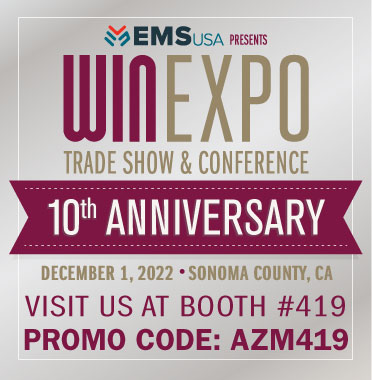 Are you looking to implement an ERP? Don't have an internal IT team to help manage the project and vendor, or not enough resources to work on the project and keep your winery running, or don't know how to explain your requirements to the ERP implementer? We specialize in helping wineries implement their ERPs successfully: we offer services including vendor selection, requirements documentation (for RFP or during project), project management, change management, business and process analysis. Come and talk to us at Win Expo, booth 419. Use code AZM419 to get a free trade floor pass or discount on conference pass.
October 6, 2022
Copper Cane Goes Live with NuTrax for Wineâ„¢ Grower ModuleCopper Cane Wine & Provisions have announced they have gone live with grower components of NuVerge's NuTrax for Wine™ software. Azmera is a reseller and implementation partner of the NuTrax for Wine™ software.
NuTrax for Wine™ is built on the Nextworld ERP's no code development platform. It offers an exciting new option for wineries wanting an enterprise scale ERP but with the flexibility and agility to tailor it for their specific needs.
Read more about the announcement here.
Azmera now offers ERP solutions for all sizes of wineries, as implementation partners for Oracle's JD Edwards and NuVerge's NuTrax for Wine™
Contact Azmera for more information or if you would like to see a demo of this new option in the Wine IT solution arena.
July 22, 2021
6 Misconceptions about JD Edwards Blend module
They say first impressions last, and that seems never truer than when it comes to the impressions of the JD Edwards Blend module. Issues and shortcomings with the module that were around in the beta and first release of Blend are still raised and commented on today, some 15 or so years later. It appears the first impressions of Blend were shared far and wide in the early days of the module and despite considerable development and improvements since then, they linger as misconceptions today.
I will address six of these I hear most often.
- “There are too many screens and clicks needed”
This is perhaps the most common complaint about Blend. And one of the most legitimate complaints off the shelf. However, since the original release, several “speed function” applications have been added to reduce the number of screens and tabs.
What Oracle has really done in the last few years, though, is to focus on improving the User Experience by delivering a suite of “personalization” tools.
Rather than address individual modules, screens, or workflows, which risks never satisfying everyone, they have developed tools that allow each winery or even user within a winery to personalize screens to suit their process. For example, we have used this to reduce the number of fields on a screen to only those relevant for a given process and consolidate separate tabs of fields onto one tab, so no additional clicks are needed.
The introduction of Orchestrator has been even more of a game changer. Entire screens can be replaced, either within JDE or by outsid e systems, from Excel to web apps, and everything in between. Orchestrator can be used to “communicate” with JDE, following all of the JDE business and logics rules, to enter, retrieve or update data in JDE. This truly allows each organization to tailor the data input experience to their processes. This combines the power of a sophisticated blend system with whatever front end interface or process the customer desires.
If you’re running Blend already, and this is a complaint in your organization, we recommend reviewing the highest pain point processes and corresponding JDE applications to map out ideal processes and see if a combination of personalization (first choice) and then Orchestrations can simplify the interface and match the processes more closely.
- “It runs all weekend”
There were certainly performance issues in the early releases of Blend, and, to be honest, it took Oracle too long to address these, but they largely have been addressed today. Over the last several years Oracle has put a lot of effort into tweaking the structure and tuning the performance of the perhaps infamous dependency chain engine so that it now performs fine. It’s a sophisticated engine that delivers complexity beyond many other systems, and in some high data volume instances there certainly is some response latency during processing, but it’s not a “go and make a cup of coffee” scenario.
If you’re experiencing longer than expected processing time, we recommend having your IT or CNC resources conduct a tuning exercise over your environment; very long processing time is no longer “normal.”
- “Blend is not easy to implement”
So, yes, it is true that implementing JDE and the Blend module is a significant undertaking. JDE is a true large-scale Enterprise Resourcing Planning (that’s what ERP stands for) system, like SAP. Being an enterprise-scale system comes with pros and cons. On the con side, they are a bigger effort to implement than small standalone applications. However, on the pro side, if implemented correctly, they can be an end-to-end (in the case of wineries, grape-to-bottle to order to cash) integrated system, in the true sense of what a system should be: you don’t have one application for your winemaker and another for your accountant.
JDE is also almost endlessly configurable (see elsewhere for a discussion on that) which again comes with a con, that configuring takes time to get right, and a pro, that it can be configured to meet each individual winery’s needs. Many standalone applications have little or no configurability options; you take what you’re given and adapt to that model.
While this might seem obvious, it is even more important with a large scale ERP implementation: we strongly recommend that you engage experienced JDE, JDE Blend and wine industry experts to help you implement.
Wine is not widgets and Blend is not Manufacturing – make sure your implementation team and consultants know that!
- “There aren’t (m)any out-of-the-box reports”
In terms of traditional reporting (i.e., add the filters, click “run,” get a report that can be printed, etc.) this was and is true. Originally, JDE went in a different direction, looking to provide in-system query applications that can viewed online, personalized, and, if desired, be exported, rather than formatted run and read reports. An application like Inventory Vessel View can be queried, reviewed, have filters changed, and re-queried, indefinitely all within the one interactive live screen rather than having to re-run a report multiple times. If data then needs to be analyzed or printed for formatting, it can then be exported and manipulated in Excel or similar tools. While this doesn’t provide the pre-canned reports of some systems, it is arguably more powerful in terms of providing live, real-time data for review.
Additionally, with the advent and growing adoption of tools such as PowerBI that allow a winery to quickly create the reports and dashboards that support their key metrics, the value of generic reports is probably dropping over time. These tools can allow for reports to be quickly built based on each winery’s specific needs, incorporating other data from outside the winemaking system when needed.
As an aside, Oracle has released role-specific dashboards within JDE, such as “winemaker” and “cellar operations,” but personally, the effort to get these to be useful for each individual winery probably outweighs the value. So, we recommend a tool such as PowerBI instead, especially as it can bring in non-JDE data as well.
- “Need to build custom solutions to fill gaps” or “Requires too many customizations”
No computer system can satisfy everyone’s needs off the shelf. JDE’s approach, which applies generally as well as to the Blend module, to dealing with customizations is two-fold:
- It is highly configurable; yes this means more up-front effort to get the configuration to match your processes and workflow, but most standard winemaking and cellar processes can be reflected through configuration.
- It can be customized; while some companies insist on a no-exceptions “vanilla” implementation (i.e., no customizations at all) and others customize to a point where it’s barely recognizable and almost impossible to upgrade, we recommend a middle ground of minimizing customization and allowing “bolt-on” customizations where necessary, making JDE and the Blend module particularly powerful.
Other smaller applications usually have very limited configuration options and many allow no customizations; they are the Quicken of blend management. This “take it or leave it” approach is great when the application functionality matches your processes, but leaves you stranded when it doesn’t. JDE offers two approaches to address this as discussed above, but this has come to be seen to be a negative rather than positive.
In part, this is because the wrong resources have been used to configure JDE and especially Blend (where knowledgeable resources are scarce but, hey, we know someone!!), resulting in process gaps and frustration or unnecessary customizations being applied. In other cases, it is because companies have made decisions to customize first, ask questions later, rather than adopting a detailed process review and solution, cost and benefit analysis before embarking down this path.
As with the section on implementation, we recommend that getting the right resources is critical in deciding on what, if any, customizations are needed. Always look to configure first, but we also believe the right customization can be worth its weight in grapes!
- "Oracle is not adding new functionality to Blend"
As stated earlier, many perceptions of the Blend module are based on the first release, and in some cases, based on the JDE 8.11 Beta release that was tested at Foster’s Wine Estates Americas (FWEA, now Treasury Wine Estates) in 2006. As part of the first production release in JDE 8.12, FWEA partnered with Oracle and helped fund a suite of key enhancements that were implemented initially there and later incorporated in releases 9.0 and 9.1. So, yes, some of these key enhancements did take time to make it out to the broader community, but they are there now.
I think it’s fair to say for a couple of years, in the mid to late 20-teens, Oracle did pull back a bit in terms of adding new functionality. However, in the last couple of years, there has been a resurgence in enhancements across the Grower and Blend modules. Additionally, Oracle’s engagement with the wine industry has increased, including with the Wine and Agribusiness user groups. Some enhancements have been “back-end” performance improvements while others have been front-end functional changes. The Blend module is part of a large ERP, so enhancements are spread across a lot of modules. But most quarterly releases over the last couple of years have contained one or more Grower or Blend enhancements, as well as benefiting from system wide tools and performance enhancements. As discussed elsewhere, Oracle is also investing strongly in the general User Experience tools, which is providing mobility, usability, and interactivity enhancements across all JDE modules, including Blend.
We have seen a re-engagement of the Wine and Agribusiness Special Interest Groups (aka User Groups) by Oracle and JDE industry customers over the last couple of years. We recommend joining and engaging in those groups, to help lobby Oracle for enhancements, hear about the latest advances, and collaborate with fellow industry customers on best practices.
Summary
The wine industry, especially in Northern California, is very close-knit, so first impressions spread quickly and can easily become lore. When JDE released the Blend module in the beta release in 2006, it was far from perfect, and those faults have become embedded in many people’s perceptions. However, JDE and the Blend module have evolved and improved over the 15 years since that beta release. It’s not a perfect system, but configured and implemented correctly, for the right scale of wine operations, it can be a powerful system and definitely worth considering.
If you’re running JDE but not Blend, or considering moving to JDE and JDE Blend, and have any of the above perceptions, we can provide a demo of the latest release and answer any questions you have.
If you’re already running Blend and haven’t realized the benefits of some of the more recent enhancements, particularly those around the User Experience, we’d be happy do a review of your system and processes and explain where you can make improvements. Check us out at www.azmeraconsulting.com or drop us an email to info@azmeraconsulting.com
June 15, 2021
Navigating a Smoother Business Process Journey (and Steering Clear of a Lean River of Waste)
Image by Gary Yost
If you’re familiar with Lean Manufacturing or Lean processes, you’re likely familiar with Lean’s philosophy of removing waste. Manufacturing isn’t the only industry in which waste can happen, often inadvertently, and often when we are trying to avoid other pitfalls. Nearly every business encounters waste, including agriculture.
The “Lean River of Waste”
The “Lean River of Waste” is often used in a supply chain context to describe how creating excess inventory is only hiding waste. It may be avoiding some problems, but the waste creates others. This phrase can also be used in non-manufacturing environments. Let’s talk about a specific example: using the River of Waste as a tool for defining appropriate staffing levels.
Using the river metaphor, let’s say your department is a vessel – a raft – traveling along the river. The river is your business process. Naturally, you want a smooth, safe, and efficient journey, right?
But there are rocks (problems and obstacles) that make for a harrowing and bumpy ride. When water levels (resources) are low, you’re going to feel the bumps of those rocks a lot more. You could add more water, but that’s expensive and wasteful, so you want the right amount. How do you know how much water you need?
Let the data tell the story
Maybe you have a lot of activity-based data about all the tasks your group performs. Fantastic. The first instinct is usually to use that data to justify either the current staffing levels or to add head count. But we’re going to take a different approach. We’re not going to manage the water; we’re going to tackle the rocks. Note: if you don’t have data, you can still follow this process using what you know as a manager. You’ll make some assumptions, but start tracking activity now, so that you can use it later.
But first, step back from the data. Clarify your strategy by answering some key questions:
- Why does your department of function exist?
- What services do you provide?
- Who are your customers?
- How do you provide value for them?
- What’s your improvement vision for your function?
Keep those answers in mind; let them steer your raft.
Now look at the data. Is it clear? Maybe it needs a little clean-up or maybe you need to clarify some points. Once that’s done, begin to analyze it. Look for the obvious trends, then dig a little deeper to get insights.
Look for the big rocks
The larger rocks or obstacles are often the easiest to find. And the rocks along your river come in many forms:
- problems that create waste (rework, downtime, inferior production)
- problems that impact your customer
- missed opportunities (where could you be adding value?)
Once you’ve identified the rocks, your next step is to prioritize them. You can’t go after everything all at once, so what’s causing the most waste, the most pain? Pick no more than three or four. Then, tackling them one at a time, run a problem-solving exercise.
What’s really causing the problem? Is it an outdated or unclear process? Do you have aging or inappropriate tools? Have the people been given enough training and support? Find the root cause. Sometimes this process involves simply asking the question “Why?” several times, for each answer you find. Identify ways to remove each rock or at least make it smaller – without adding any water to the river!
Step and Repeat
Put plans in place to implement those solutions and continue (or start!) to gather activity data. Check in again and make sure they worked and make adjustments as needed (PDCA). Then tackle the next group of rocks. Repeat this process until you run out of rocks.
Once you’ve fixed most of the major problems, you’re going to have a pretty stable riverbed. Now you can decide what the right water level should be for smooth sailing. Translated: once you’ve fixed your major obstacles, you can easily determine what the RIGHT staffing levels should be.
How might you address the “rocks” in your organization?
If the task feels daunting, or you don’t know quite where to begin, chances are we can help. At Azmera, we thrive when we can identify and tackle “rocks,” leaving you with a smoother ride.

image by Angga Indratama
June 10, 2021
A Little Planning Goes a Long Way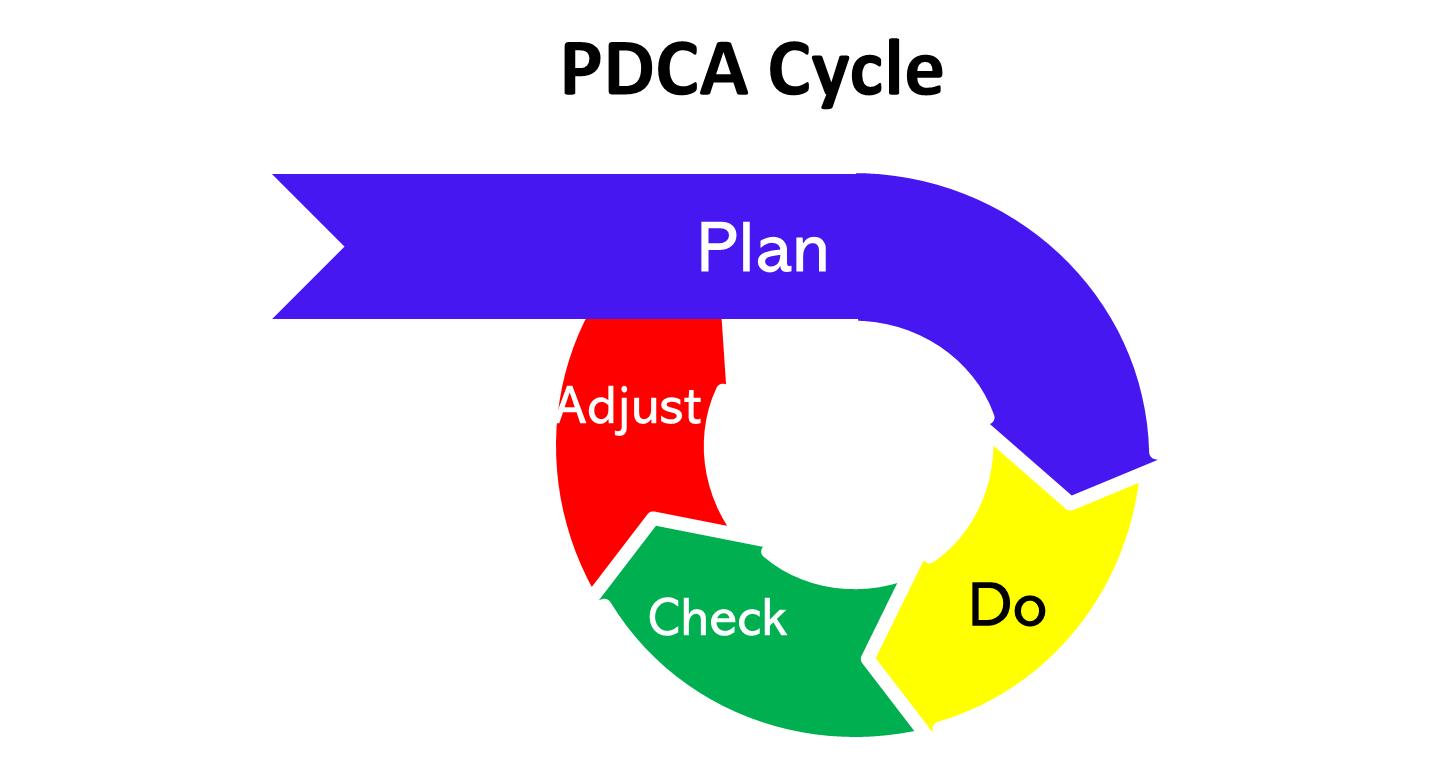 It’s been said that a picture is worth a thousand words. In the image above, the “Plan” section easily exceeds the remaining elements combined. Why is that?
Well, a little planning goes a long way. When the planning part is done right, the rest of the process goes a lot more smoothly. It makes things seem to happen as if by magic.
Planning is probably the best front-end investment you can make on any initiative – whether it’s a small project, a medium sized Continuous Improvement rollout, a large system implementation – or anything in between. The importance of planning is closely followed by Process Focus, but that’s a different article.
Defining Planning
When we hear “planning,” many of us from the corporate world have an immediate association with the long cycles of strategic, capital, and budget planning that never seem to end. That’s not what I’m talking about.
I’m talking about something more practical: a few steps to be applied before you launch into your task, quick hit, or small project. I can come up with so many examples of times that the planning piece was skipped because “we know what to do, so let’s not waste time. Just do it.” So we just did it - ready, fire, aim - and we didn’t know what to do. The impact was 100% waste: wasted time, wasted materials, wasted effort…and then there’s the time spent to fix it – rework!
Steps to a Successful Plan
There are a lot of synonyms for planning. I’d like to group a few of them together – considering, measuring, outlining, and preparing -- into four steps that make up practical planning.
- Considering. Think about what you are trying to accomplish. Consider it from multiple angles. Think through the consequences. Look for potential obstacles and unintended consequences. What do we need to communicate and who needs to know? Is there a big change impact? Is there a process change? Are people going to need to be trained or educated? (Not the same thing!) What kind of resources are we going to need?
- Measuring. What are your goals? How will you know if it’s successful? How will you know if you have a problem that you will need to address? Are there associated costs or benefits? How will we track these?
- Preparing. What do we need to get ready before we start? Do we need to buy some materials? Get some help? Prepare a space? Assess the tools? Print something? Identify all the resources you’re going to need.
- Outlining. Lay out the actions that you identified in the steps above. List them in the order that they need to happen. How long will each step take? When can each step start? Who is going to do what? Are there major communication points? Add in check-ins for step 2.
All four steps can take 15 minutes or a few hours, depending upon the size of the project.
Now you have a plan. All you have to do is follow it!
May 4, 2021
New Enhancements in JD Edwards 9.2.5.3 Grower Modules Improve ProcessesLast week, Oracle announced the release of JD Edwards 9.2.5.3. This release includes a swag of functional enhancements across numerous processes and modules and quite a lot of tools updates to Orchestrator.
Of particular interest to our clients are three enhancements to the Grower and Grower Contracts & Payments modules. Here’s what each of these enhancements deliver.
Allow Harvest Dates to Overlap
Previously the one block, or field, could not have start and end dates of separate harvests overlap (apart from using sub-blocks). This will be very useful for crops for which there are overlapping pre and post-harvest activities and costs. Previously, the post-harvest activities and costs would be recorded against the next harvest, or the pre-harvest activities against the prior, accepting that it is directionally correct.
Here’s how a typical block and harvest would be set-up now.

Here’s how the harvests can now be created, to more accurately reflect the growing cycle and activities of the crop(s) on that block.

So, what are some scenarios where this configuration would make sense?
Post-harvest processing
Some crops are processed after harvesting (e.g. ginning of cotton), and that post-harvest activity can affect the final yield, pricing, and quality of the harvested crops. At the same time as the post-harvest processing, work on the next season’s harvest, such as tilling, pre-emergent herbicides, and planting are being done on that same block. This new feature will allow the post-harvest processing to be recorded against the “completing” harvest and the new crop’s activities to be recorded against the “beginning.”
Overlapping Fruit and Blossom
Certain varieties of citrus blossom for the next season’s fruit while the current season’s fruit is still on the tree. During this period two distinct activities can be occurring to the same trees: harvesting of the ripe fruit and treatment (e.g. spraying of pesticides) of the flowers. The harvest activities can now be recorded against the “completing” harvest and the treatment activities against the “beginning” harvest.
Ability to Edit Planted Area
This new feature allows the planted area of a harvest block to be edited after an operation has been recorded against that harvest block. Previously, once an operation was recorded, this attribute was locked. This will be particularly useful for row crops where certain activities such as tilling, application of pre-emergent herbicides and fertilizers, etc. are done before planting. Once planting is completed, the planted area can now be updated to reflect the actual planted area, taking into account areas that didn’t sprout, or were missed, etc., rather than having to keep the planned planted area in place for that growing cycle. This will support precision farming with more accurate yields, applications rates, etc.
Ability to Change Contract Header and Block End Dates to an Earlier Date
For various reasons, a contract may need to be ended earlier than initially intended. For example, an evergreen contract may be carried over to a new year and the new harvest generated after which, for various reasons, it is decided to end the contract. Before this change it wasn’t possible to change the contract end date back to when it actually ended (except via the all-evil SQL update) but this change now makes that possible and, in this example, the newly generated harvest could also be terminated.
Each of these new enhancements increases the functionality of JD Edwards Grower and Grower Contracts and Payments Modules, and should improve the efficiency and processing for those who use them.
This release contains numerous other functional enhancements across inventory, procurement, quality, manufacturing and more that agribusinesses and wineries may find useful. It also contains more tools enhancements, particularly for Orchestrator. For details on all of these check out: https://docs.oracle.com/cd/E84502_01/learnjde/announcements.html
Disclaimer: The above analysis is based on our understanding of current and new JD Edwards functionality and related agribusiness and wine processes. We do not guarantee systems functionality or applicability of the functionality to any scenario.
March 25, 2021
Safer, Better, Easier in the Vineyard - Operational CISafer, Better, Easier is the motto we employ as the overriding goal of our Lean-based Continuous Improvement (CI) programs that we roll out at vineyards and wineries.
I’ve been thinking of how to explain why this is our motto, what it means and the results it can drive. Then we got this email from a client's Vineyard Manager on how one small component of a broader Lean/CI program was fulfilling this goal, and it says it better than I could. It hits all three components multiple times, and importantly, with overlap of the three goals.
- Safer: “they feel safer”, “lot less accidents”, “lot less…property damage”, “less…wire getting caught in mowers”
- Better: “do more value added work”, “cost savings”, “productivity increase”, “cleaner”
- Easier: “eliminating…no-value added work”, “lot less accidents”, “less…wire getting caught in mowers”
But enough from me; let them explain it in their own words:
“Good morning,
We have received some great feedback from the Vineyard Team’s Operators in regards to the Lean Hazard Board. The Operators have communicated to the management team and myself that they feel Safer and feel the vineyards are a lot cleaner pertaining to broken stakes, broken/ loose wires and broken end posts. We have seen a lot less accidents and property damage in regards to broken doors, broken windows or wire getting caught up in the mowers thus eliminating wasted time. This allows the mechanics and operators to add value to other areas of work within the vineyard.
For reference, before the Lean Hazard Board, we would need four full time employees working almost year round on fixing hazard items (stakes, wires and posts). With the Lean Hazard Board in action, the workers are able to take ownership communicating the hazard and noting them on the board. Management then either weekly or biweekly creates a work order to fix and mitigate all hazards on the board utilizing usually one employee and sometimes two. With this system we are able now to use only two employees for about 2 months to fix the hazard items resulting in a cost savings pertaining to Trellis Repair. We have also seen productivity increase with all cultural activities.
In Summary the Lean Hazard Board has helped with:
- Eliminating waste – non-value added work…
- That results in a cost savings and…
- Frees people up to do more value added work and…
- Makes for a SAFER work place!”
If you’d like to see how we can help you make your vineyard/farming or winery operations Safer, Better and Easier, contact us and let’s see how we can help you.
March 18, 2021
Looking for a Grape-to-Bottle Wine Production System? Is it time to replace your ancient wine production systems? Do any of these statements sound familiar?
- Winemakers have to use time-consuming workarounds
- We have to use spreadsheets to keep track of information
- Our vineyard management, grower contracts, and wine production systems don’t talk to each other
- We have to enter the same information more than once
- It takes days to create the information we need
- Our systems are difficult and expensive to maintain
If any of these describe you, Azmera invites you to join us for a Free Webinar where our partner, NuVerge, will demonstrate the “NuTrax™ for Wine” wine production software system.
Whether you’re looking for vineyard, grower, or cellar management systems, or a complete “ERP”, you can’t miss checking out this cutting-edge, no-code/low-code cloud-based technology.
Date/Time: Wed, March 31st 3pm-4pm PT
Register here, or if you’re unable to make it, drop us a line.
Visit www.azmeraconsulting.com to find out more about what we do.
March 4, 2021
Applying Lean Values to a JD Edwards UpgradeTwo of the services we offer are, on the surface, very different: JD Edwards (JDE) implementation and support, and Lean-based Continuous Improvement programs.
Recently, though, we had occasion to apply the principles of Lean to how we were dealing with a JDE customer. This customer, to whom we provide Managed Services (aka Support) for their JDE Grower and Grower Contracts modules, is planning a fairly large JDE upgrade, getting up to date on ESUs (aka bugs and enhancements) and tools (aka infrastructure). The customer asked how Azmera should be involved in the Grower component of the upgrade.
Based on prior experience of upgrades gone badly, our consultant replied describing the various activities and deliverables that he felt were best practice in an upgrade like this. This included opportunities to leverage new functionality. He did add a note that these activities didn’t necessarily correspond to hours or cost and that he wasn’t trying to upsell. They should all be included in the upgrade plan though. The customer responded expressing surprise, perhaps doubt and certainly some resistance, at the extent of activities recommended.
We realized that what we felt were the important and valuable steps in the upgrade, weren’t necessarily what the client valued. This is when we applied our Lean know-how: one of the key principles of Lean is understanding Customer Value. Once understood, you eliminate or reduce anything that the customer doesn’t value. Apart from what the customer values, the only steps/costs/resources that should be included are those required due to regulation, safety, or to be able to fulfil the process. Those that are required but not valued should be reduced as much as possible.
We reviewed the correspondence and determined that what the client valued most was “keeping the lights on” after the upgrade. Anything beyond that, such as new functionality or process improvements, was “nice to have” and perhaps could be looked at later. Eliminating these components of the recommendation was easy, as they weren’t a required part of the upgrade.
Trickier were components that we felt were best practice and more likely to provide a more robust and risk-reduced outcome, but which may not be truly necessary to “keep the lights on”. We could insist they were best practice, but then that would be applying our values onto the client. The risk with that being a loss-loss outcome if we ended up antagonizing them; the client might decide not to engage us in the upgrade (a loss of revenue for us) and the client might end up with a failed upgrade without our expertise.
We decided the best approach was to explain why we felt these steps were important and the risk of not including them or including cut down versions of them. We would then leave it up to the client whether that changed their perception of the value of each step. So long as the client values at least the minimum to lead to a successful upgrade, the outcome is more likely to be a win-win. The client will engage us in providing services that they value (so some revenue for us) and they will have a successful upgrade.
Of course, if the client doesn’t value the bare minimum for a successful upgrade, we should consider politely declining the gig. We don’t want to be part of a process that is more likely than not to lead to failure, as we value our reputation for successful outcomes.
Visit www.azmeraconsulting.com to find out more of what we do.
March 1, 2021
NuVerge Announces Strategic Alliance with AzmeraNuVerge is proud to announce a strategic alliance and reseller agreement with Azmera. Azmera is a management and systems solution provider dedicated solely to serving the Wine and Agriculture industries.
LONGMONT, COLO. FEBRUARY 22, 2021 - NuVerge is proud to announce a strategic alliance and reseller agreement with Azmera. Azmera is a management and systems solution provider dedicated solely to serving the Wine and Agriculture industries.
Azmera is an independent firm that delivers technology and operational solutions grounded in people, process, and systems. They approach each client’s needs by understanding how these three aspects of their client’s business interact to design and implement the best solutions to solve their unique problems. With a methodology based on Lean and Continuous Improvement and adapted to cater for the specific needs and cadence of farming and winery operations, they help by implementing a program and culture of continuous improvement across their client’s operations.
NuTrax™ for Wine and NuTrax™ for Agriculture are NuVerge industry solutions built for the Wine & Beverage and Agriculture industries. The solutions are built on next generation SaaS + PaaS application technologies with accelerators and pre-configurations that jump start your next strategic Enterprise Grade Wine & Beverage applications move.
Phil Bourke, Azmera President, stated, “Our partnership with NuVerge will extend our capability in the wine and agriculture industries with next-generation wine & agriculture applications. This relationship will allow us to enhance the synergies of our technology and continuous improvement services. Their NuTrax™ for Wine and NuTrax™ for Agriculture products were specifically designed for these industries and built on a no-code technology platform. This next generation of software and technology will accelerate business process automation and digital transformation for our clients.” Phil continued, “Under the terms of the agreement, Azmera will have distribution and resell rights to NuVerge™ products, automation tools, and consultative services.”
“Azmera stands above the rest in being solution providers and not just system implementers. They have a long history of successfully using a Lean-based methodology approach to consistently deliver process improvement across their customers’ operations. Together the partnership will provide our mutual clients with Azmera’s industry & process expertise and our software and automation capabilities. This will reduce our client’s operational cost while allowing them to leverage digital processes for the best customer experience,” said Mark Goedde, President & CEO.
About NuVerge
Established in 2018, NuVerge is a Global Reseller of Nextworld™ ERP Applications and Nextbot™ (a No-Code platform for business process automation). NuVerge is committed to leveraging Next Generation Business Software and Technologies that focused on digital transformation and accelerated process automation. The NuVerge Strategy is simple; assist our clients in the untethering of legacy software while improving their organizational performance and growing their business at an unprecedented pace.
NuVerge is headquartered in Longmont, Colorado and serves its North American client base from its East and West regional offices. Please visit http://www.nuverge.com for additional information.
About Azmera
Established in 2016, Azmera provides system implementation, Lean-based continuous improvement, and IT management services to the wine and agricultural industries. Azmera’s philosophy is to provide their clients with the best technologies and processes to support and enable the success of their core business. They have a simple goal to help their clients work safer, better, and easier.
Azmera is headquartered in Napa, California.
Visit http://www.azmeraconsulting.com for more information.
March 1, 2021
NuTrax for AgricultureAzmera would like to invite all vineyard owners, vineyard management companies, and wineries who purchase grapes to a webinar on NuVerge’s NuTrax™ for Agriculture software. NuTrax™ for Agriculture is the Grower and Grower Contacts component of NuTrax™ for Wine. This new software solution for the Wine industry is built on next generation SaaS + PaaS application technologies with accelerators and pre-configurations that jump start your next strategic Enterprise Grade Wine move.
Date & Time: Web Feb 24th @ 2pm PT
Link to register: https://www.nuverge.com/